VPN Super is now available on Mac. Connect from your Dock or menu bar, choose from 60+ countries, and sign in with the Premium account you already have.
VPN Super is now available on Mac. Bring the VPN experience you already know to your laptop or desktop, whether you're working from home, connecting on the go, or moving between your Mac and other devices throughout the day.
The new VPN Super Mac app is built for macOS, with quick connections, easy-to-find server locations, and a menu-bar shortcut that keeps everything close at hand. It runs on both Apple Silicon and Intel Macs, and uses the same network of 60+ countries and over 100 locations available with VPN Super Premium on iPhone and Windows.
Already have VPN Super Premium? There's no need to sign up for another plan. Simply download the Mac app, sign in with your existing account, and you're ready to go. If you haven't created an account, see how to create a VPN Super account.
VPN Super for Mac is a native macOS app that helps keep your internet connection private without adding another complicated step to your day.
Once connected, it routes your Mac's internet traffic through the VPN Super server of your choice, keeping your connection encrypted and secure online.
It's designed to feel at home on your Mac, too. Open it from your Dock, check your connection status at a glance, or connect directly from the menu bar without opening the main window.
And if you're already using VPN Super on your phone, getting started is simple. Your Mac uses the same Premium account, as long as you have created an account.
Think of it as bringing your VPN Super experience to one more part of your everyday routine.
A VPN should be easy to use when you need it and stay out of the way when you don't. That's the thinking behind the Mac app.
Here's what you can expect.
Closing your MacBook, opening it again, or switching between Wi-Fi and Ethernet shouldn't mean starting your connection from scratch.
VPN Super is designed to reconnect when your Mac wakes from sleep or changes networks. If a connection drops, it can also detect the problem and reconnect automatically.
That's one less thing to think about when you're moving between meetings, working from different places, or simply picking up where you left off.
The Mac app fits right into the way you already use macOS.
Open VPN Super from your Dock to access the full app, or use the menu-bar icon when you want to connect without interrupting what you're doing. Both the Dock icon and menu bar also help you check your connection status.
It's a small detail, but it makes a difference when you want your VPN ready without having to think about it.
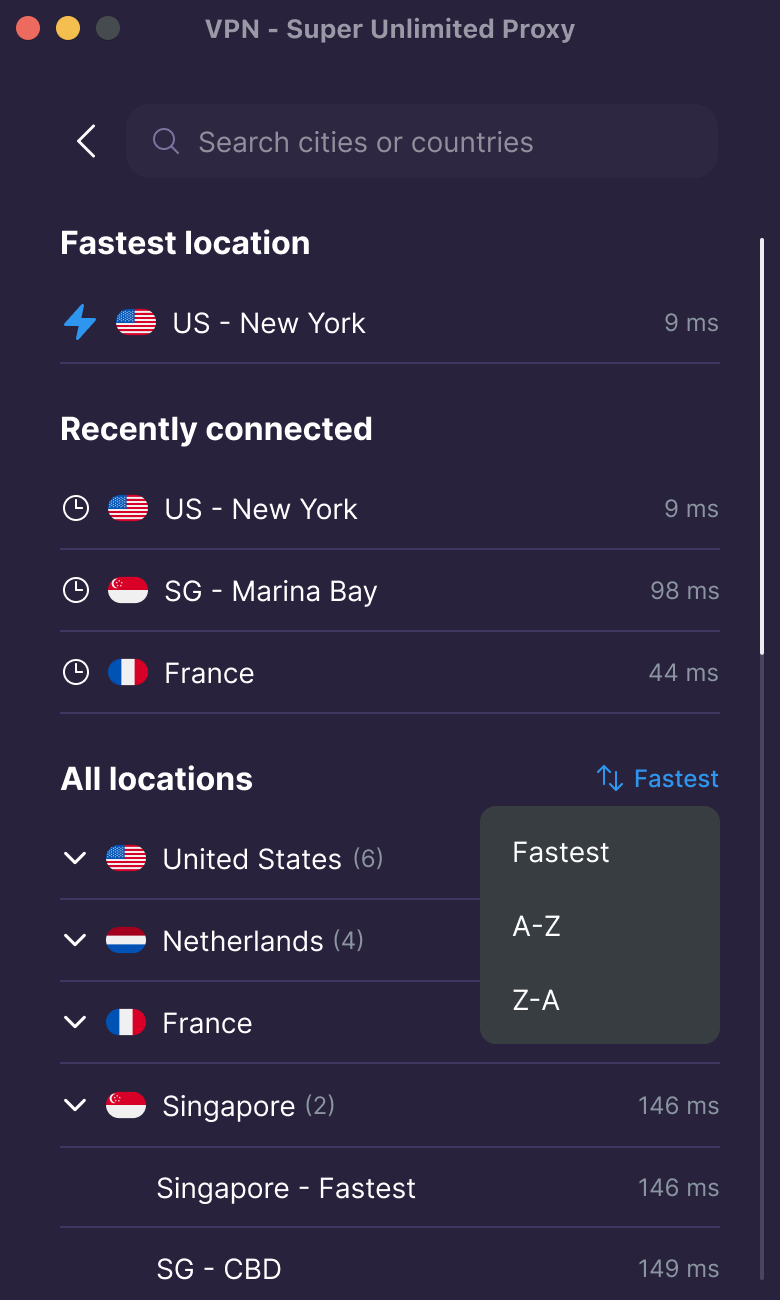
VPN Super gives you access to 60+ countries and over 100 locations across its Premium servers, so you can choose the location that works for you.
Finding it is straightforward. Search by country or city, sort locations by current latency to help identify a responsive server, or revisit a recent location from the top of the list.
If you use the same location often, you won't have to keep searching for it. And if you want to try somewhere different, the full server list is right there.
The Mac app uses WireGuard, a modern, open-source VPN protocol designed around a relatively small codebase and contemporary cryptography.
That means you can connect through a protocol built with performance and security in mind, without needing to understand the technical details to use it.
With Kill Switch enabled, even if your VPN connection drops unexpectedly, your internet access pauses automatically so your real location and internet traffic aren't exposed. It's off by default. To turn it on, go to the app menu (☰) → Settings → Kill Switch (privacy protection).
The Mac app updates itself, uses native macOS notifications, and lets you check your subscription status in the app menu under My Account, including your plan length and renewal date. It's also available in 15 languages and follows your Mac's language.
Need help? You can contact Support from inside the app, with diagnostic information attached to your request automatically if you allow it. That gives the Support team useful context from the start and can help reduce back-and-forth when troubleshooting.
Ready to give VPN Super for Mac a try?
The VPN Super Mac app works on Macs running macOS 13 Ventura or later. It supports both Apple Silicon and Intel processors.
Here's a quick checklist before you install:
| Requirement | Details |
|---|---|
| macOS | macOS 13 Ventura or later |
| Compatible Macs | Apple Silicon (M1 and newer) and Intel |
| Subscription | VPN Super Premium |
| Download | Directly from vpnsuper.com/vpn-download/vpn-mac |
To check your macOS version, click the Apple menu in the top-left corner of your screen and select About This Mac.
Note that the Mac app is a direct download from the VPN Super website, rather than a listing in the Mac App Store. The App Store listing is for iPhone and iPad.
Your Mac can connect to a VPN through macOS settings, but macOS doesn't provide its own VPN server network. VPN Super makes that process simpler by bringing the service, server selection, and connection controls together in one app.
If you're new to VPNs and want to understand what they do, here's a helpful place to start: what a VPN protects you from.
Getting started takes just a few steps.
That's it. You can now connect to a VPN from your Mac.
For more detailed instructions, follow the step-by-step Mac setup guide.
Once you've installed the app, connecting is straightforward.
Open VPN Super and click Connect. The app will connect you to a suitable location, or you can choose a country or city from the server list before connecting.
Prefer to keep things in the background? You can connect directly from the menu bar, without opening the main window.
You can also enable Launch at login in Settings if you'd like VPN Super to be ready when you sign in to your Mac.
If you encounter any issues, the Mac connection troubleshooting guide can help you get back up and running.
Yes. Your VPN Super Premium subscription works across supported devices, including Mac, Windows, iPhone, Android, Android TV, and Apple TV.
On your Mac, sign in with the same account you use on your phone. You won't need to purchase another Premium plan just to use VPN Super on Mac.
You'll also have access to the same network of 60+ countries and over 100 locations available with VPN Super Premium on iPhone and Windows.
If you're setting up your devices for the first time, you can find the list of available apps on the VPN Super download page, including the apps for Windows and iPhone and iPad.
VPN Super for Mac is available to VPN Super Premium subscribers. If you already have Premium on your phone, you can sign in on your Mac with the same account at no extra cost. There is no free tier for the Mac app.
Yes. The Mac app supports both Intel Macs and Apple Silicon Macs, including M1 and later.
As long as your Mac device is running macOS 13 Ventura or later, you'll be able to install and use VPN Super. If you're using macOS 12 Monterey or an older version, you'll need to update your operating system if your Mac supports it. Mac devices that are compatible with macOS 13 Ventura include:
VPN Super for Mac uses WireGuard, an open-source VPN protocol combining fast speeds with state-of-the-art cryptography.
VPN Super for Mac brings the full VPN Super Premium network to your Mac, with a native desktop experience designed to fit into your day.
Connect from your Dock or menu bar, find your preferred server, and let the app handle reconnecting when your Mac wakes up or changes networks. And if you're already a Premium subscriber, you can get started with the account you have today.
Give VPN Super for Mac a try today. To stay up-to-date on the latest fixes and improvements, check the VPN Super for Mac release notes.
 VPN for MelbourneUnlock the global internet in Melbourne with VPN - Super Unlimited Proxy. Enjoy secure, unrestricted access to your favorite content seamlessly.
 VPN for iOS: The Complete Guide to Protecting Your iPhone and iPadThis comprehensive guide explains why iPhone and iPad users need VPN protection and how to set it up easily. Despite Apple's built-in security, iOS devices remain vulnerable to public WiFi threats, ISP tracking, and geographic restrictions. The article walks through setting up VPN - Super Unlimited Proxy, highlighting its free features like unlimited bandwidth, 80+ global servers, and no activity logging. It also covers iOS-specific benefits, troubleshooting common issues, and when to consider upgrading to premium features for enhanced speed and multi-device protection.
 NetflixIs Super Why! on Netflix?Discover if Super Why! is on Netflix and learn how to watch it globally with a VPN. Find out the countries where it's available!

Our biggest sale ever.
Get up to 70% off VPN Super. Plans from $3.49 a month.
Our biggest sale ever.
Get up to 70% off VPN Super. Plans from $3.49 a month.